
A patient visits the doctor, receives a prescription, and then walks to the pharmacy.
On the surface, it looks simple.
But behind that interaction, a clinic may need to manage several connected activities:
- Was the prescription created correctly?
- Is the prescribed medicine available?
- How much stock is left?
- Was the medicine dispensed?
- Was the transaction billed?
- Was the pharmacy activity recorded against the patient’s visit?
- Does the relevant information remain available in the patient’s record?
When EMR, prescriptions, pharmacy inventory, dispensing, and billing operate through disconnected systems, staff may have to repeatedly enter, verify, or transfer information.
This can create unnecessary administrative work and make it harder for clinics to maintain a consistent view of the patient’s journey.
A connected healthcare platform takes a different approach.
Instead of treating the pharmacy as an isolated department, clinics can connect:
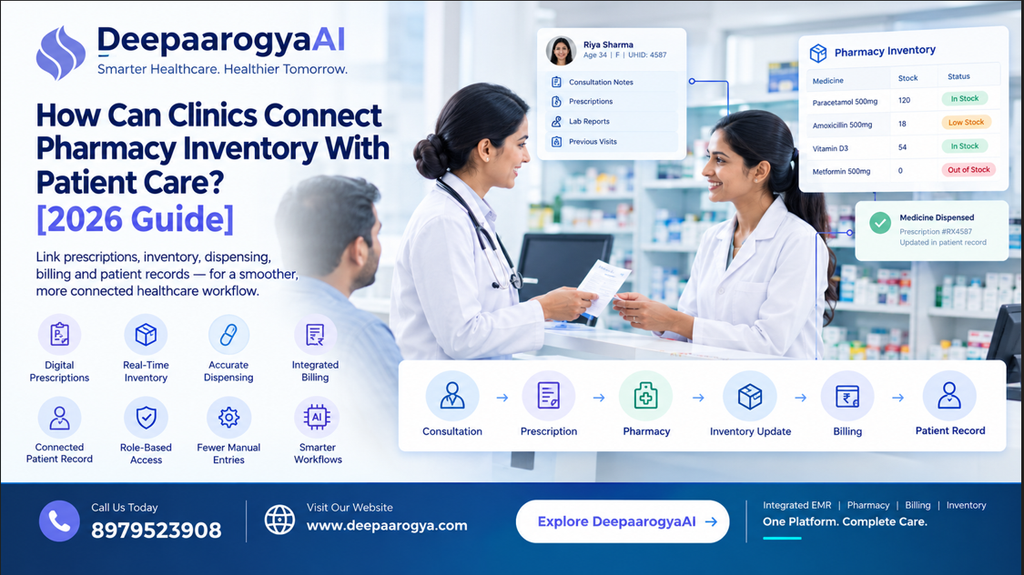
Consultation → Prescription → Pharmacy → Dispensing → Inventory → Billing → Patient Record
This is where DeepaarogyaAI can help clinics bring clinical and operational workflows together through a connected healthcare platform.
What Is Connected Pharmacy Management?
Connected pharmacy management means linking pharmacy operations with the clinical and administrative workflows that already exist within a clinic or hospital.
A typical workflow can look like:
Doctor Consultation
↓
Prescription Created
↓
Pharmacy Receives Prescription
↓
Medicine Availability Checked
↓
Medicine Dispensed
↓
Inventory Updated
↓
Billing Processed
↓
Patient Record Updated
Rather than maintaining separate information trails for each activity, the clinic can organize them around the patient’s overall healthcare workflow.
The exact process can vary depending on the clinic’s pharmacy setup, inventory requirements, billing model, and software configuration.
Why Do Clinics Struggle With Disconnected Pharmacy Workflows?
Pharmacy operations involve more than simply handing medicines to patients.
There can be hundreds of products, frequent stock movements, prescriptions, billing transactions, returns, expiry considerations, and inventory updates.
When these activities are disconnected from the clinical workflow, several challenges can arise.
1. Prescription and Pharmacy Information May Be Separated
A doctor may create a prescription in the EMR while the pharmacy team uses a different application or manual process.
The pharmacy staff may then have to manually interpret or re-enter prescription information.
This creates an additional handoff.
2. Medicine Availability May Not Be Immediately Visible
A doctor may prescribe a medicine without having direct visibility into whether the pharmacy currently has it in stock.
The patient may only discover the issue when they reach the pharmacy counter.
3. Staff May Have to Enter the Same Information Multiple Times
If the prescription, pharmacy, inventory, and billing systems are not connected, staff may have to enter similar information repeatedly.
This increases administrative work and creates more opportunities for data-entry errors.
4. Pharmacy Records Can Become Disconnected From Patient Records
A prescription may exist in the patient’s clinical record while dispensing information is maintained separately.
This makes it harder to maintain a complete digital history of the patient’s interaction with the clinic.
What Should a Modern Clinic Pharmacy Workflow Include?
A well-organized pharmacy workflow should cover more than inventory.
It should connect several important activities.
Prescription Management
The doctor creates a prescription during the consultation.
Inventory Management
The pharmacy maintains information about available medicines and stock movements.
Dispensing
The pharmacy records the medicines actually provided to the patient.
Billing
Relevant pharmacy transactions can be connected with the appropriate billing workflow.
Patient Record
Relevant prescription and pharmacy information remains associated with the patient’s healthcare record.
Reporting
Authorized users can use available information to understand pharmacy operations and stock movement.
The objective is simple:
Create one organized workflow instead of multiple disconnected records.
How Does Connected Pharmacy Management Work?
Let’s consider a simple patient journey.
Step 1: Patient Consultation
The patient meets the doctor.
The doctor reviews the patient’s information and creates a prescription as part of the consultation workflow.
Step 2: Prescription Enters the Pharmacy Workflow
The prescription can become part of the pharmacy workflow instead of requiring staff to recreate the information manually.
Step 3: Pharmacy Reviews the Prescription
The pharmacy team reviews the prescription and processes the medicines according to the clinic’s configured workflow.
Step 4: Dispensing Is Recorded
The pharmacy records the medicines that were dispensed.
Step 5: Inventory Is Updated
The corresponding inventory information can be updated based on the dispensing transaction.
Step 6: Billing Is Processed
Where configured, pharmacy activity can be connected with the appropriate billing workflow.
Step 7: Patient Record Remains Updated
Relevant information remains associated with the patient’s broader healthcare record.
This creates a connected chain:
Consultation → Prescription → Pharmacy → Dispensing → Billing → Patient Record
Why Is Pharmacy Inventory Visibility Important?
Pharmacy inventory is an important operational function for clinics that dispense medicines.
The pharmacy team needs to know what is available, what has been dispensed, and which stock movements require attention.
Without organized inventory management, staff may spend time checking:
- Current stock
- Recent dispensing
- Medicine availability
- Stock movement
- Expiry information
- Reorder requirements
- Billing records
A digital inventory workflow can make these activities more structured and easier to manage.
However, every clinic has different requirements.
A small clinic pharmacy may need a simpler workflow than a hospital managing multiple departments and a larger inventory.
Therefore, the software should support the clinic’s actual operating model.
How Can Clinics Reduce Repeated Data Entry?
One of the biggest opportunities in connected healthcare software is reducing unnecessary information movement.
Consider two approaches.
Disconnected Workflow
Doctor
↓
Creates prescription
↓
Pharmacy receives information
↓
Staff manually enters medicine details
↓
Billing staff enters information again
↓
Inventory is updated separately
Connected Workflow
Doctor
↓
Prescription
↓
Pharmacy
↓
Dispensing
↓
Inventory + Billing
↓
Patient Record
The second approach can reduce unnecessary repetition when the underlying systems are properly integrated.
For clinics, this can mean less time spent copying information between systems and more time focused on actual patient and operational workflows.
How Can Connected Pharmacy Workflows Support Doctors?
Doctors do not need to manage every pharmacy operation themselves.
Their primary responsibility remains clinical care.
However, when pharmacy workflows are connected to the broader healthcare system, information can move more smoothly between clinical and operational teams.
For example:
Doctor: Creates prescription
↓
Pharmacy: Processes prescription
↓
System: Maintains relevant information
↓
Patient: Receives prescribed medicines
This creates clearer separation of responsibilities while keeping the workflow connected.
The pharmacy team manages pharmacy operations.
The doctor manages clinical decisions.
The system connects the relevant information.
Why Does Role-Based Access Matter?
Healthcare software contains sensitive patient and operational information.
A connected platform should therefore provide appropriate access controls.
Different users may require access to different workflows.
For example:
| Role | Typical Workflow |
|---|---|
| Doctor | Consultation and prescription |
| Pharmacy Staff | Dispensing and inventory |
| Billing Staff | Billing and payments |
| Reception Staff | Registration and appointments |
| Nurse | Relevant clinical workflows |
| Administrator | Operational management |
The goal is to create connectivity without giving every employee unrestricted access to every part of the system.
Role-based access can help clinics organize responsibilities according to the user’s role.
How Can Pharmacy and Billing Work Together?
Pharmacy and billing often overlap.
A patient may receive:
- Consultation
- Medicines
- Diagnostic services
- Physiotherapy
- Other healthcare services
When financial information is maintained separately from operational activity, staff may need to reconcile records manually.
A connected healthcare platform can bring relevant pharmacy transactions into the broader billing workflow.
This can help clinics maintain a clearer relationship between:
Prescription → Dispensing → Transaction → Billing Record
The exact billing workflow should be configured according to the clinic’s pricing, payment, package, GST, and operational requirements.
Can Pharmacy Data Stay Connected to the Patient Record?
Yes, when the healthcare platform is designed around a connected patient record.
A prescription is not an isolated document.
It is part of a patient’s consultation and broader healthcare history.
A connected workflow can maintain the relationship between:
Patient
↓
Consultation
↓
Doctor
↓
Prescription
↓
Pharmacy
↓
Dispensing
↓
Billing
This gives authorized users a more organized view of the patient’s healthcare activity.
The objective is not to collect unnecessary information.
The objective is to make relevant information available to the right person at the right stage of the workflow.
Where Does AI Fit Into Pharmacy Workflows?
AI does not need to independently decide which medicine should be prescribed or dispensed.
Clinical decisions remain with qualified healthcare professionals.
Instead, AI can support the documentation and administrative processes surrounding healthcare workflows.
For example, AI can assist with:
- Structuring clinical documentation
- Creating visit summaries
- Preparing documentation drafts
- Organizing available patient information
- Supporting repetitive administrative workflows
DeepaarogyaAI includes AI-assisted healthcare workflows designed to support areas such as clinical documentation and patient summaries.
The important principle is:
AI assists. Healthcare professionals review. The approved workflow continues.
This approach keeps technology focused on reducing administrative effort without replacing professional clinical judgment.
How DeepaarogyaAI Can Connect Pharmacy With Patient Care
DeepaarogyaAI is positioned as an AI Hospital OS for Indian clinics and hospitals, bringing multiple healthcare workflows into a broader connected platform.
Its platform includes workflows such as:
- EMR
- OPD
- IPD
- Pharmacy
- Billing & GST
- Physiotherapy
- Nutrition
- Radiology
- e-Prescriptions
- AI-assisted workflows
- Integrations
This allows pharmacy to become part of the larger patient workflow rather than functioning as an isolated system.
A possible connected workflow:
Patient Registration
↓
Doctor Consultation
↓
Prescription
↓
Pharmacy Processing
↓
Medicine Dispensing
↓
Inventory Update
↓
Billing
↓
Patient Record
The goal is:
The pharmacy should be part of the healthcare workflow—not a separate system operating beside it.
7 Ways Clinics Can Improve Pharmacy Workflows
1. Connect Prescriptions With Dispensing
Reduce unnecessary manual steps between the doctor’s prescription and pharmacy processing.
2. Maintain Centralized Inventory Information
Give pharmacy staff a structured view of relevant stock information and movements.
3. Connect Pharmacy With Billing
Where appropriate, connect pharmacy transactions with the clinic’s financial workflow.
4. Link Pharmacy Activity to the Patient
Maintain the relationship between the patient, consultation, prescription, and dispensing record.
5. Reduce Repeated Data Entry
Identify places where employees repeatedly copy information from one application to another.
6. Define Role-Based Access
Ensure doctors, pharmacy staff, billing teams, receptionists, and administrators have appropriate access.
7. Review the Workflow Regularly
As the clinic grows, its pharmacy requirements may change.
The digital workflow should be capable of adapting with the organization.
Common Pharmacy Management Mistakes Clinics Should Avoid
❌ Treating Pharmacy Software as Completely Separate From Clinical Care
The pharmacy is part of the patient’s broader healthcare journey.
❌ Depending Entirely on Spreadsheets
Spreadsheets may work for limited operations but can become increasingly difficult to manage as transaction volume grows.
❌ Re-entering Prescription Information Manually
Repeated data entry adds administrative work and can introduce avoidable errors.
❌ Separating Dispensing From the Patient Record
Keeping dispensing information completely separate can make it harder to maintain a connected history.
❌ Giving Every User the Same Access
Different roles have different responsibilities and should have appropriately scoped access.
❌ Buying Software Without Mapping the Workflow
Technology should solve an operational problem rather than simply adding another application.
A Practical Pharmacy Digitization Checklist
Before implementing or improving pharmacy software, clinics can ask the following questions.
Prescription
- Can doctors create prescriptions digitally?
- Is the prescription associated with the patient’s visit?
- Can approved prescriptions enter the pharmacy workflow?
Inventory
- Can pharmacy staff manage inventory digitally?
- Can stock movements be tracked?
- Can the system support the clinic’s inventory requirements?
Dispensing
- Can pharmacy staff record what was dispensed?
- Is dispensing connected to the relevant prescription?
Billing
- Can pharmacy transactions connect with billing?
- Can the clinic maintain appropriate financial records?
Patient Record
- Is relevant pharmacy information associated with the patient?
- Can authorized users access the information they need?
Security
- Are user roles clearly defined?
- Is access appropriate for different departments?
Scalability
- Can the workflow support additional departments?
- Can the system adapt as the clinic grows?
Why Connected Pharmacy Management Matters for Growing Clinics
A small clinic may initially manage pharmacy operations with a simple process.
But as the organization grows, the number of:
Doctors + Patients + Prescriptions + Medicines + Transactions + Departments
also increases.
At that point, disconnected workflows can become increasingly difficult to coordinate.
The solution is not necessarily to add more software.
It can be to connect the workflows the clinic already needs.
A healthcare platform that brings EMR, pharmacy, billing, and other operational workflows together can provide a stronger foundation for this approach.
Instead of asking:
“Do we have pharmacy software?”
clinics can also ask:
“Is our pharmacy connected to the rest of our healthcare workflow?”
That distinction can be important when planning digital transformation.
What Does the Future of Pharmacy Management Look Like?
Healthcare does not happen in isolated departments.
A patient may move through:
Reception → Doctor → Pharmacy → Billing → Follow-Up
The information should not have to restart at every step.
A connected pharmacy workflow can help bring clinical and operational processes closer together while allowing each department to focus on its own responsibilities.
This means moving from:
“Where is the information?”
to:
“The relevant information is already connected to the patient’s workflow.”
That is one of the larger opportunities offered by modern healthcare software.
Conclusion
Pharmacy management is about more than tracking medicines.
It is connected to:
Prescriptions + Inventory + Dispensing + Billing + Patient Records + Clinical Workflows
When these processes operate independently, staff may spend unnecessary time entering, checking, and transferring information.
A connected healthcare platform can help clinics bring these workflows together.
With DeepaarogyaAI, clinics can bring EMR, OPD, IPD, pharmacy, billing, specialty workflows, integrations, and AI-assisted capabilities into a broader healthcare platform.
The objective is straightforward:
Connect pharmacy operations with patient care instead of managing them as separate workflows.
For a growing clinic, the important question is not simply:
“Do we have pharmacy software?”
It is:
“Is our pharmacy connected to the rest of our healthcare workflow?”
When prescription, dispensing, inventory, billing, and patient records work together, clinics can create a more organized digital workflow for both staff and patients.
FAQs
1. What is connected pharmacy management?
Connected pharmacy management links prescription, dispensing, inventory, billing, and relevant patient-record workflows rather than managing each activity as a completely separate process.
2. Why should pharmacy be connected to the EMR?
Connecting pharmacy with the EMR can help reduce repeated data entry and keep relevant prescription and dispensing information associated with the patient’s healthcare record.
3. Can pharmacy and billing workflows be connected?
Yes. A healthcare platform can connect relevant pharmacy transactions with billing workflows, depending on the clinic’s configuration and operational requirements.
4. Does DeepaarogyaAI include pharmacy management?
Yes. Pharmacy is part of the healthcare workflows offered through DeepaarogyaAI alongside areas such as EMR, OPD, IPD, billing, physiotherapy, nutrition, and radiology.
5. Can different employees have different access?
Yes. Role-based access can allow doctors, pharmacy teams, billing staff, receptionists, nurses, and administrators to access the workflows relevant to their responsibilities.
6. Can AI prescribe medicines independently?
AI should not independently make clinical prescribing decisions. AI can assist with appropriate documentation and administrative workflows, while healthcare professionals review and approve clinical outputs.
7. Is pharmacy management useful only for hospitals?
No. Pharmacy workflows can be useful for clinics, hospitals, and other healthcare organizations that dispense medicines. The required workflow depends on the organization’s size and operating model.
8. How can clinics reduce pharmacy-related manual work?
Clinics can start by connecting prescriptions, dispensing, inventory, billing, and patient records and identifying where staff repeatedly copy the same information between systems.
SEO Details
Primary Keyword:
Pharmacy management for clinics
Secondary Keywords:
- pharmacy inventory management
- clinic pharmacy software
- EMR pharmacy integration
- healthcare pharmacy management
- digital pharmacy management
- prescription and inventory management
- pharmacy inventory software
- hospital pharmacy workflow
- connected pharmacy management
- AI hospital management software
- pharmacy EMR integration
- healthcare inventory management
SEO Title:
Pharmacy Management for Clinics: Connect Inventory & EMR [2026]
Meta Description:
Learn how clinics can connect prescriptions, pharmacy inventory, dispensing, billing, and patient records through a more organized healthcare workflow.
Suggested URL Slug:pharmacy-management-clinics-emr-inventory
Suggested Image Alt Text:Connected pharmacy inventory and EMR workflow for clinics using DeepaarogyaAI
Suggested Internal Links
- AI Hospital Operating System
- Customizable EMR Workflows
- Connected Patient Record
- AI-Powered Healthcare Workflows
- WhatsApp e-Prescription
- Billing & GST
- AI Agents
- Radiology Workflow
- Physiotherapy EMR