
Introduction:
Every doctor understands the importance of patient records.
Whether it’s consultation history, prescriptions, laboratory reports, diagnoses, or follow-up details, patient data is one of the most valuable assets of any clinic or hospital.
However, many healthcare providers still struggle with common questions like:
- How can I securely back up my patient data?
- Can I export my EMR data anytime?
- How do I analyze patient records in Excel?
- Can I store my hospital data in my own Google Drive?
With Deepaarogya AI’s Google Drive Integration, the answer is yes.
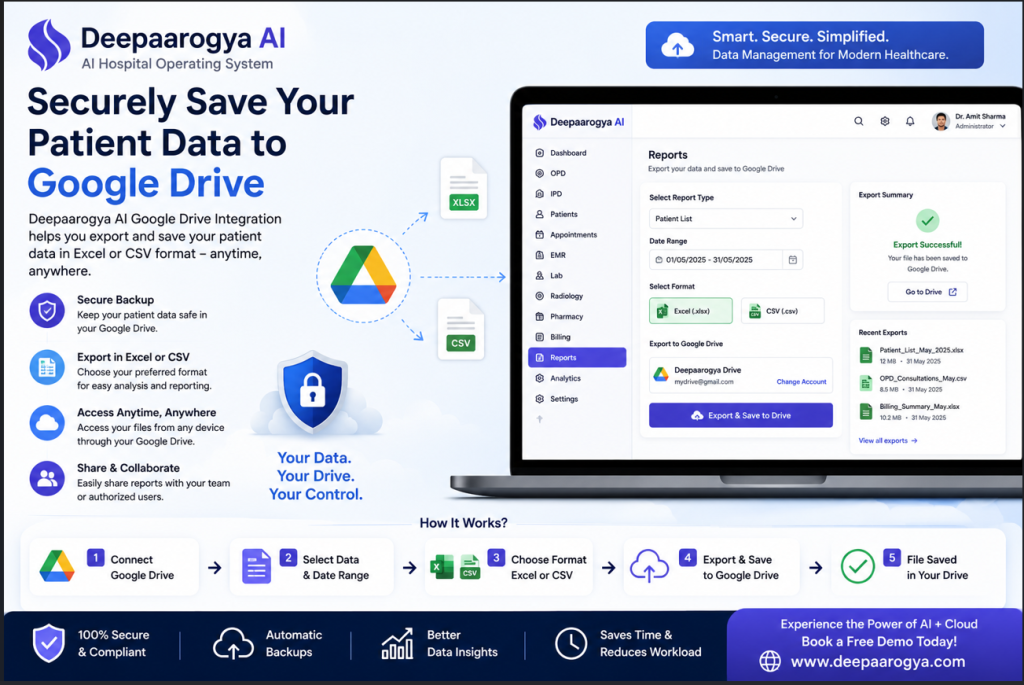
Our platform allows doctors and hospitals to securely export and store patient data directly in their own Google Drive account in Excel (.xlsx) or CSV (.csv) format, giving them complete control over their data.
Why Doctors Need Cloud-Based Data Backup
Patient records grow every day.
As your practice expands, managing thousands of records becomes increasingly challenging.
Many clinics still depend on:
- Local computer storage
- External hard drives
- Manual Excel files
- USB backups
These methods carry risks such as hardware failure, accidental deletion, and difficulty accessing information across devices.
Cloud storage provides a safer and more convenient alternative.
Deepaarogya AI + Google Drive Integration
Deepaarogya AI integrates directly with Google Drive, allowing healthcare providers to back up and organize their data without extra manual work.
With just a few clicks, you can export and save:
- Patient Registration Data
- Appointment Records
- Consultation History
- Electronic Medical Records (EMR)
- Billing Reports
- Revenue Reports
- Laboratory Data
- Prescription Records
- Follow-up Data
- Custom Reports
All files are saved directly to your own Google Drive account, ensuring you maintain ownership and access to your information.
Export Patient Data in Your Preferred Format
Every healthcare organization has different reporting needs.
That’s why Deepaarogya AI gives you the flexibility to export data in multiple formats.
Excel (.xlsx)
Perfect for:
- Monthly reports
- Hospital management
- Financial analysis
- Patient statistics
- Administrative reporting
CSV (.csv)
Ideal for:
- Data analysis
- Business intelligence tools
- Research projects
- Importing into other software
- Custom dashboards
You decide which format works best for your workflow.
Complete Control Over Your Data
Unlike many traditional hospital management systems, Deepaarogya AI gives healthcare providers greater flexibility over their own records.
You can:
✅ Export patient data whenever you need it
✅ Save reports directly to your Google Drive
✅ Organize files into your preferred folders
✅ Share reports securely with authorized team members
✅ Maintain backups for future reference
Your data stays under your control.
Reduce Manual Work with Automated Exports
Instead of downloading files, renaming them, and uploading them manually, Deepaarogya AI streamlines the process.
Simply choose:
- The data you want to export
- The file format (Excel or CSV)
- Your connected Google Drive account
The system takes care of the rest.
This saves valuable administrative time while keeping records organized.
Benefits of Google Drive Integration for Doctors
Secure Cloud Backup
Store important patient reports safely in your Google Drive.
Easy Data Sharing
Share reports with authorized administrators, accountants, or healthcare teams whenever required.
Better Data Analysis
Export reports to Excel or CSV for advanced reporting, financial analysis, or research.
Work From Anywhere
Access your exported files securely from any device connected to your Google account.
Improved Practice Management
Maintain organized backups and simplify record management without relying on manual processes.
Built for Clinics and Hospitals of Every Size
Whether you operate:
- A single-doctor clinic
- A polyclinic
- A diagnostic center
- A specialty hospital
- A multi-specialty hospital
Deepaarogya AI helps you securely manage and export your healthcare data with ease.
More Than Just Google Drive Integration
Deepaarogya AI is a complete AI Hospital Operating System that combines intelligent automation with modern healthcare management.
In addition to Google Drive integration, the platform offers:
AI Clinical Tools
- AI Medical Scribe
- AI SOAP Notes
- AI Patient Summary
- AI Discharge Summary
Hospital Management
- Electronic Medical Records (EMR)
- OPD & IPD Management
- Appointment Scheduling
- Billing & Insurance
- Laboratory Management
- Pharmacy Management
- Radiology Management
Patient Engagement
- WhatsApp Appointment Reminders
- Digital Prescriptions
- Follow-up Notifications
- Telemedicine
Everything works together on one connected platform.
Why Choose Deepaarogya AI?
Healthcare providers choose Deepaarogya AI because it combines intelligent hospital management with practical integrations that simplify everyday work.
With Google Drive integration, you can:
- Keep secure backups of your records
- Export reports in Excel or CSV format
- Access files anytime through your Google Drive
- Improve reporting and data analysis
- Maintain complete ownership of your exported data
It’s one more way Deepaarogya AI helps clinics and hospitals work smarter—not harder.
Frequently Asked Questions (FAQs)
Can I save my patient data directly to Google Drive?
Yes. Deepaarogya AI allows you to export and save patient data, reports, and other records directly to your connected Google Drive account.
Which file formats are supported?
Deepaarogya AI supports exporting data in Excel (.xlsx) and CSV (.csv) formats, making it easy to analyze or share your information.
Can I choose which data to export?
Yes. You can export selected reports, patient records, appointments, billing information, and other datasets based on your requirements.
Is my exported data stored in my own Google Drive?
Yes. Files are saved to your connected Google Drive account, giving you control over where they are stored and how they are organized.
Who can benefit from this feature?
Doctors, clinics, hospitals, diagnostic centers, and healthcare administrators who want secure backups, easy reporting, and flexible data management.
Ready to Simplify Patient Data Management?
Managing healthcare data should be secure, flexible, and hassle-free.
With Deepaarogya AI’s Google Drive Integration, you can export patient records and hospital reports directly to your own Google Drive in Excel or CSV format—making backups, reporting, and collaboration easier than ever.
Book a free demo today and discover how Deepaarogya AI can help you manage your hospital data with confidence.